vue笔记
vue笔记
vue笔记
emit
- 使用方法
子元素:
<script>
...省略
method:{
    function(){
        this.$emit("标识符(父组件中用同一个名称)",[,要传递给父元素的参数])
    }
}
...
</script>
父元素:


<element @标识符="想要调用的函数,或者要执行的代码,如果带参数,就不是子元素传递上来的参数"></element>

如:
<element @标识符="function([,arg])"></element>

<script>
...省略
    method:{
        要执行的函数(){
            函数体;
        }
    }
...
</script>
例子
<template>
    <div class="pagination">
        <button @click="previousPage()" >{{ '<' }}</button>

                <span>{{ currentPage }}</span>

        <button  @click="nextPage()" >></button>

    </div>

</template>

<script>
export default {

    methods: {
        previousPage() {
            if (this.currentPage > 1) {
                this.$emit('previousPage');
            }
        },
        nextPage() {
            // console.log(this.currentPage)
            // console.log(this.totalPages)

            if (this.currentPage < this.totalPages) {
                this.$emit('nextPage');
            }
        }
    },props:['currentPage','totalPages']
};
</script>
<template>
    <div>
        <!-- Your content goes here -->

        <pagination :currentPage="currentPage" :totalPages="totalPages" @previousPage="previousPageF"
            @nextPage="nextPageF" />
    </div>

</template>

<script>

export default {

    name: 'MainView',
    data(){
        return {

            currentPage: 1,
            totalPages: 10,
        };

    },

    methods: {
        previousPageF(){
            if (this.currentPage > 1) {
                this.currentPage--;

            }
        },
        nextPageF(){
            if (this.currentPage < this.totalPages) {
                this.currentPage++;

            }
        }
    },
    watch: {
        currentPage: function(val){
            this.$router.replace({ path: '/mainView', params: {currentPage: this.currentPage}});
        }
    }
}
</script>
上面是一个翻页按钮的程序
子组件定义了两个标识符previousPage和nextPage ,并且传递给父组件,使得currentPage参数得以增加或者减少,再通过绑定currentPage参数和totalPages参数将数据传回给子组件
vuex
使用方法
- 在new Vue对象的定义方法中添加你写的vuex中的store对象
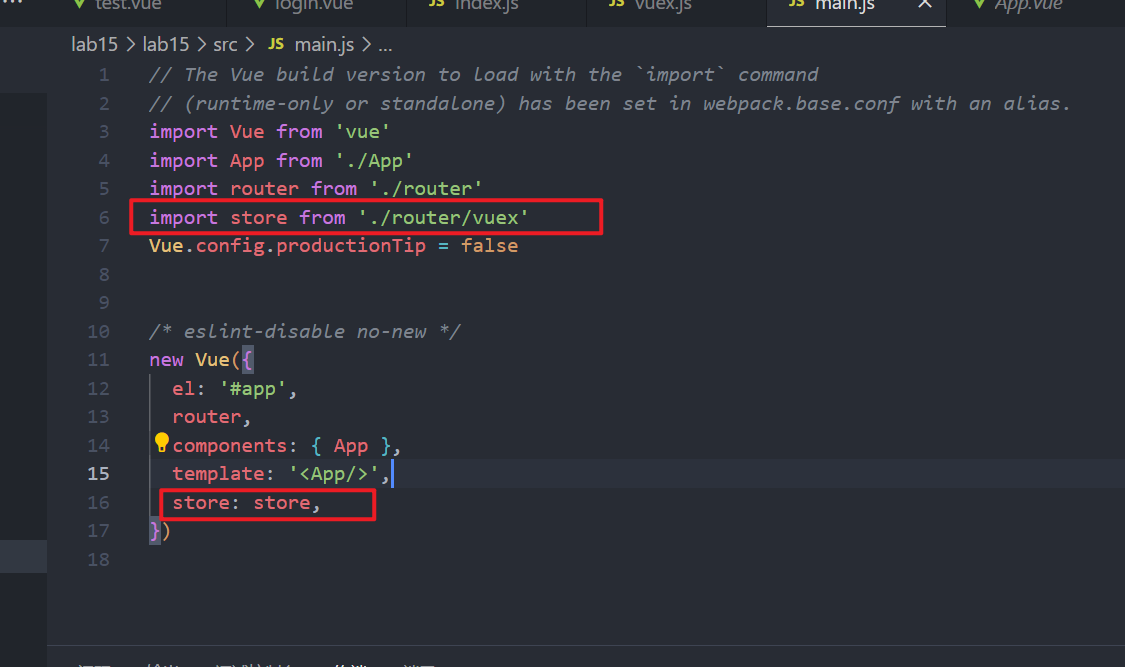
- 编写你的vuex js文件
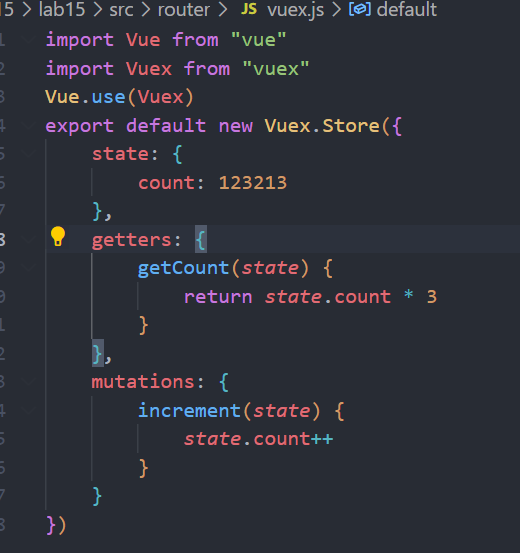
包含state,getters,mutation,actions,四个部分
- state
- getters
- mutations
- actions
保存数据的真正地方,如图中的count
提取数据方法
this.$store.state.state中的键
相当于store中的计算方法,可以对数据处理再返回数据出去
使用方法
this.$store.getters.getters中的键
改变数据的地方
- 特点
- 操作是同步的,操作完成之后,数据会同步刷新
使用方法
在javascript代码中使用
例子
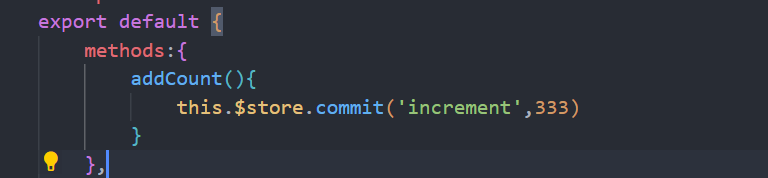
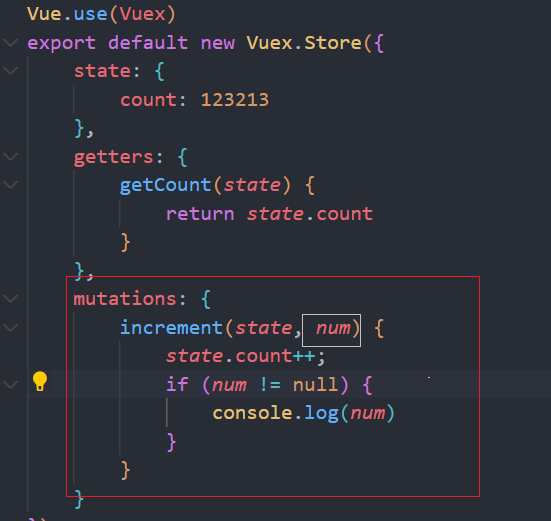
this.$store.commit('mutations中填写的名称',参数[,可选])
同样是改变数据的地方(异步)
- 特点
- 操作是异步的,数据更新之前,还可以进行其他操作
使用方法
在javascript代码中使用
this.$store.dispatch('mutations中填写的名称',参数)
import axios from 'axios'
import Vue from 'vue'
import Vuex from 'vuex'

Vue.use(Vuex)

const state = {   //存放状态(即数据)
    count: 42,
    person: {
        name: 'default',
        age: 20
    },
    weatherdata: {}
}
const getters = {  //state的计算属性
    newCount: state => {
        console.log("store.js-getters--" + state.count)
        return (state.count * 2)
    },
    newname: state => state.count

}
const mutations = {  //更改state中状态的逻辑,同步操作
    ADDIN(state) {
        state.count += 1
        console.log("store.js-ADDIN-" + state.count)
    },
    reduce(state, n) {
        state.count -= n
        console.log("store.js-reduce-" + state.count)
    },
    changename(state, name) {
        //情况1
        setTimeout(function () {
            state.person.name = name
        }, 1000)
        //情况2
        // state.person.name = name
    },
    changeage(state, age) {
        setTimeout(() => {
            state.person.age = age
        }, 100);

    },
    changeweather(state, w) {
        state.weatherdata = w
    }
}

const actions = {  //提交到mutation,异步操作
    changeageinfo(context, age = 18) {
        setTimeout(function () {
            console.log(context)
            context.commit('changeage', age)
        }, 1000)
    },
    actionstop(context, payload) {
        setTimeout(function () {
            console.log(context)
            context.commit('changename', payload.test)
            payload.success()
        }, 1000)
    },
    weatheraxios(context) {
        // this.axios
        axios({
            method: "get",
            // url:"http://wthrcdn.etouch.cn/weather_mini",
            // url:"http://t.weather.sojson.com/api/weather/city/101030100",
            url: "/static/test.json",
            headers: {
                // 'Content-type':"application/json;charset=utf-8"
            },
            params: {
                // citykey:"101280101"
            },
            dataTypa: 'json',
        })
            .then((res) => {
                // context.commit('changeweather', res.data.data)
                console.log(res.data)
                console.log("成功")
            })
            .catch(function (error) {
                console.log(error)
                alert("服务器连接异常")
                console.log("失败")
            })
    },
    ws(context) {
        // this.axios
        axios({
            method: "get",
            // url:"api/weather",
            // http://t.weather.sojson.com/api/weather/city/101280101
            url: "api/weather/city/101280601",  //深圳
            // url:"api/weather/city/101280101",  //广州
            headers: {
                'Content-type': "application/json;charset=utf-8"
            },
            params: {
                // city:"广州"
            },
            dataTypa: 'json',
        })
            .then((res) => {
                context.commit('changeweather', res.data.data)
                console.log(res.data)
                console.log("成功")
            })
            .catch(function (error) {
                console.log(error)
                alert("服务器连接异常")
                console.log("失败")
            })
    },
    axiospost(context) {
        // this.axios
        axios({
            method: "post",
            url: "http://test/...",
            headers: {
                'Content-type': "application/json;charset=utf-8"
            },
            data: {
                a: ""
            },
            dataTypa: 'json',
        })
            .then((res) => {
                console.log(res.data)
                console.log("成功")
            })
            .catch(function (error) {
                console.log(error)
                alert("服务器连接异常")
                console.log("失败")
            })
    }
}

export default new Vuex.Store({
    state,
    getters,
    mutations,
    actions,
    modules: {}
})
在其他地方调用store中的getter和mutation和action
- mapGetters
mapGetter对象可以映射store中的getter中方法
使用:
- 导入mapGetters
- import { mapGetters } from ‘vuex’;
- 映射方法
- …mapGetters([‘getBooks’, ‘getBooksByCategoryName’]),
- 然后直接使用
- this.getBooks
- mapMutations
- 同上
- mapActions
- 同上
可以直接一起写
import { mapGetters, mapMutations ,mapActions} from ‘vuex’;
传入多个参数
mutation中这样写
setUserIDAndName(state, { userId, userName })
action中这样写
context.commit('setUserIDAndName', { userId: response.data[1].userId, userName: response.data[2].userName });
axios
使用方法
- 在终端中输入
npm install axios@恰当的版本号
- 在store类(参见vuex)中的action的方法中书写方法,如下所示
weatheraxios(context) {
        // this.axios
        axios({
            method: "get",
            // url:"http://wthrcdn.etouch.cn/weather_mini",
            // url:"http://t.weather.sojson.com/api/weather/city/101030100",
            url: "/static/test.json",
            headers: {
                // 'Content-type':"application/json;charset=utf-8"
            },
            params: {
                // citykey:"101280101"
            },
            dataTypa: 'json',
        })
            .then((res) => {
                // context.commit('changeweather', res.data.data)
                console.log(res.data)
                console.log("成功")
            })
            .catch(function (error) {
                console.log(error)
                alert("服务器连接异常")
                console.log("失败")
            })
    },
- 若是跨域请求,要配置代理表,

1. 找到项目中的index.js配置文件
2. 在module.export 中编写proxytable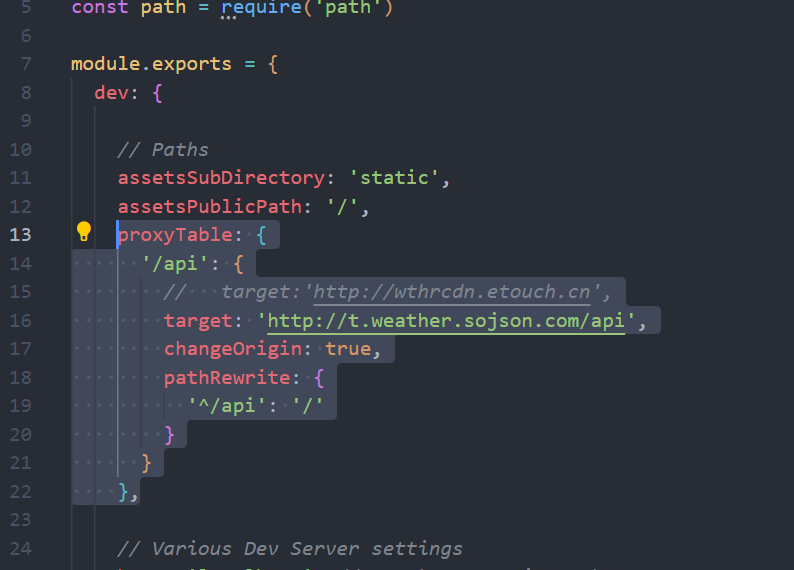
proxyTable: {
      '/api': {
        //   target:'http://wthrcdn.etouch.cn',
        target: 'http://t.weather.sojson.com/api',
        changeOrigin: true,
        pathRewrite: {
          '^/api': '/'
        }
      }
    },
api : 要代理的url
target :目标域
pathRewrite :路径重写,上面使用了正则表达式匹配
路由
- 路由访问时参数传递
- params
- 通过在route里面配置动态路由,自动匹配参数
- query
- 用于切换下一页等
- 可以对相同路径的路由作
- 例子
- params
this.$router.push({ name: 'mainView', query: { currentPage: this.currentPage, totalPages: this.totalPages } })
this.$route.query.参数名;
- 解释

  > 通过query属性,传递了一个对象,这个对象有两个属性,currentPage,totalPages,然后用下面的代码进行使用
对后端发起请求
- 对后端发起请求的时候,请注意要使用异步的请求,不然就会出现后端数据还没到,前端就已经在读取数据了例子:
getBooksAxiox(context) {
      const url = `${window.location.origin}/api/books`;
      console.log("正在访问的URL:", url); // 打印出真正访问的URL
        //返回一个promise对象,以便异步调用
      return new Promise((resolve, reject) => {
        axios.post('/api/books')
          .then(response => {
            context.commit('setBooks', response.data);
            //没搞懂什么意思,但是千万别动
            resolve(response.data);
          })
          .catch(error => {
            console.error("书籍获取失败", error);
            reject(error);
          });
      });
    }
在组件的created钩子函数中请求数据,和加载数据的时候,要等后端请求结束之后,再进行,所以采用如下写法主要是.then(),这个要在上面返回promise对象才能调用

created() {
    this.$store.dispatch("getBooksAxiox").then(() => {
      this.$store.dispatch("getAuthorsAxiox")
      if (this.$route.query.currentPage != null) {
        this.currentPage = parseInt(this.$route.query.currentPage);
      } else {
        this.currentPage = 1;
      }
    })
  }
解析:返回一个promise对象,然后方法的调用者就可以使用异步的调用
根据路径导入图片
require(`@/assets/images/${this.filteredAuthors.image}`)
this.filteredAuthors.image 获取的图片的名字
示例代码
<template>
  <div class="app-container">
    <Sidebar @country-selected="filterAuthorsByCountry" />
    <div class="authors-view">
      <h2>作家百科</h2>

      <hr class="divider">
      <div class="author-list">
        <div v-for="(author, index) in filteredAuthors" :key="index">
          <div class="author-card" @click="goToAuthorDetail(author)">
            <div class="author-thumbnail">
              <img :src="getAuthorsImageURl(author.image)" :alt="author.name" class="author-image">
            </div>

            <div class="author-info">
              <p class="author-name">{{ author.name }}</p>

              <p class="author-bio">{{ author.bio }}</p>

            </div>

          </div>

          <hr v-if="index < filteredAuthors.length - 1" class="divider">
        </div>

      </div>

    </div>

  </div>

</template>

<script>
import Sidebar from '@/components/Sidebar.vue';
import { mapGetters } from 'vuex';

export default {
  name: 'AuthorsView',
  components: {
    Sidebar,
  },
  data() {
    return {
      filteredAuthors: [], // 用于存放筛选后的作家数据
      selectedCountry: null,
      img: null,
    };
  },
  computed: {
    ...mapGetters(['getAuthors']),
  },
  created() {
    //加载数据
    this.$store.dispatch("getBooksAxiox").then(() => {
      this.$store.dispatch("getAuthorsAxiox").then(() => {
        this.resetAuthorsView(); // 初始化时显示所有作家
        this.img = require(`@/assets/images/${this.filteredAuthors.image}`)
      })
    })


  },
  methods: {
    filterAuthorsByCountry(country) {
      if (country) {
        this.filteredAuthors = this.getAuthors.filter(author => author.country === country);
        this.selectedCountry = country;
      } else {
        this.resetAuthorsView();
      }
    },
    goToAuthorDetail(author) {
      this.$router.push({ name: 'AuthorDetail', params: { authorId: author.id } }).catch(err => {
        if (err.name !== 'NavigationDuplicated') {
          throw err;
        }
      });
    },
    resetAuthorsView() {
      this.filteredAuthors = this.getAuthors;
      this.selectedCountry = null;
    },
    getAuthorsImageURl(authorUrl) {
      return require(`@/assets/images/${authorUrl}`);
    }
  },
  watch: {
    $route() {
      this.resetAuthorsView();
    }
  }
};
</script>
更新: 2025-08-09 13:43:55
原文: https://www.yuque.com/duifangzhengzaishuru-rqbua/axyc58/ig6q2020inhmknch